REAPER Script · Sound Library
Atlas
Explore, organize, and command your sound libraries.
Also available as part of the Temper Bundle.
How it works
The libraries you own are bigger than the time you have to dig through them. Atlas turns every connected library into a single ecosystem inside REAPER. Embed metadata as fast as you can right click. Search by what you want to hear, not by filename. Run as many parallel hunts as you can think up, each in its own tab. Your collection becomes a tool that learns the way you work.
Search the way you think, not the way files are named
Atlas runs every query through a sound design lexicon that knows footstep belongs to walk, gravel, and Foley before it ever sees a filename. SEEK words lock in what you want. OMIT words push back against what keeps surfacing. The shorter the thought, the smarter the return.
Stack as many parallel searches as you can think up
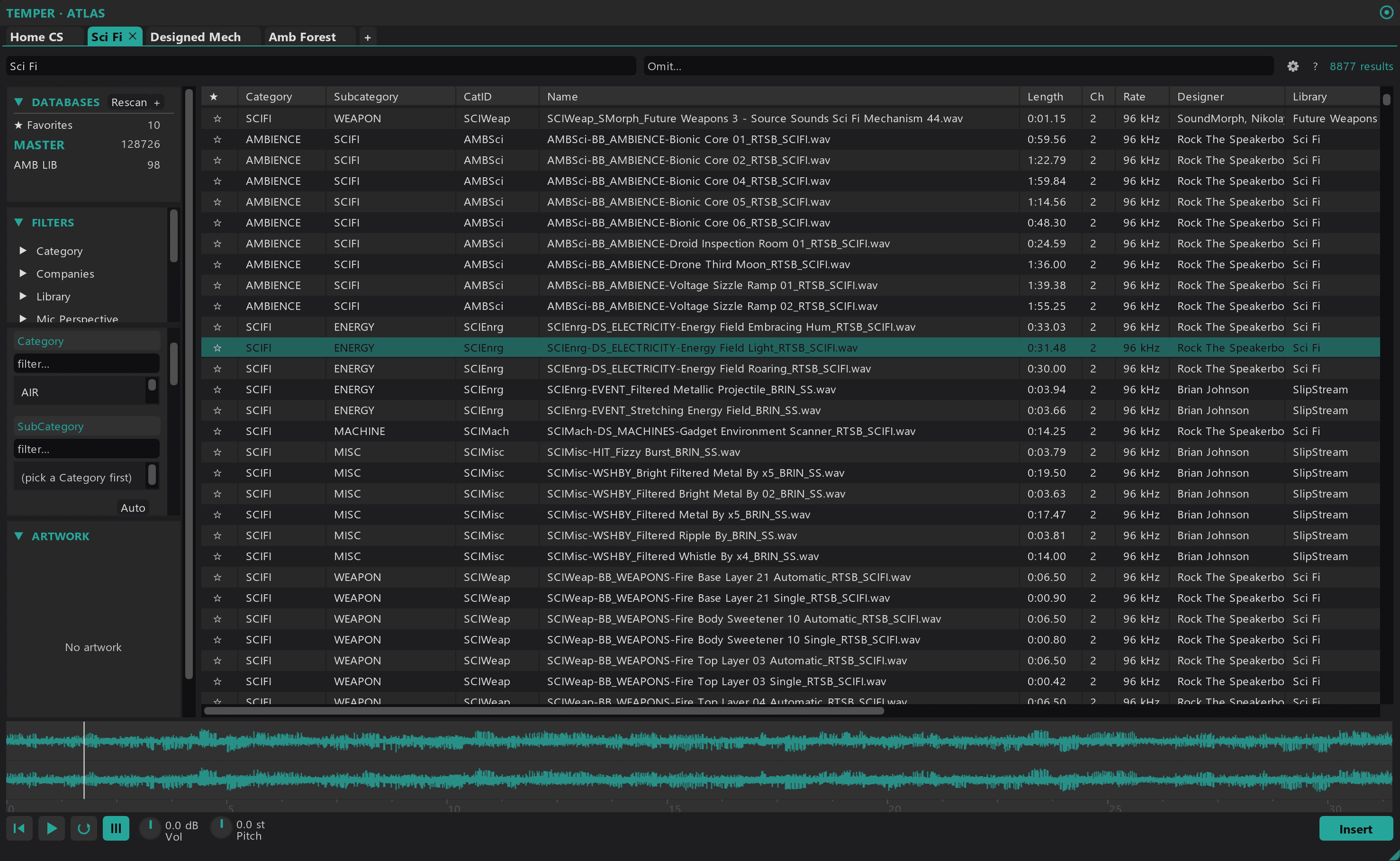
Every tab holds its own query, filters, sort, and audition selection. One tab for impacts. Another for textures. Another for that lo fi rumble you swear lives somewhere on your drive. Switch between them without losing the thread of any single hunt.
Lock in constraints with a stack of filter types
Filter by category, subcategory, library, designer, microphone, recording space, recording technique, mic perspective, recording medium, and any custom tag you have stamped on a file. Stack them. Invert them. Tighten the pool until what you hear is what you wanted.
Embed metadata as fast as a right click
Atlas writes full iXML metadata back to disk so every future search finds the version you curated. Right click any row to populate description, category, subcategory, designer, library, and UCS tags through a column array built for batch edits. Stamp once. Every tool that reads iXML inherits the work.
Make the layout look like the way you work
Reorder columns. Surface library artwork in the rail. Star anything worth coming back to into a virtual Favourites database that follows you across sessions. Atlas is a tool you tailor down to the column order, not a viewer you adapt around.
Refine your library, not just access it
Atlas is not a faster file picker. It is the layer that takes the libraries you already own and turns them into a single ecosystem you can shape to your own taste, your own categories, and your own working language. The longer you use it, the more the library starts to feel like yours.
How it works
Open Atlas. Point it at the MediaDBs you already use, or build one from a folder of sounds.
Type a thought into the search bar. Filter by category, library, or any field you've tagged. Open a new tab whenever you start a parallel search.
Click rows to audition. Scrub the waveform. Star anything worth keeping for later.
Drag the sound onto any track in the arrange view. Drop. Done.
Requirements
- Windows 10 or 11
- REAPER 7.x or later
- ReaImGui extension
- SWS extension
- js_ReaScriptAPI v0.980 or newer (with JS_Composite + JS_LICE support)
Atlas
Also available as part of the Temper Bundle.
Actively developed and supported. Found a bug? Report it and it gets fixed.